
Changelog

Follow new updates and improvements to Training Monitor App.

May 30, 2026 Updates
New


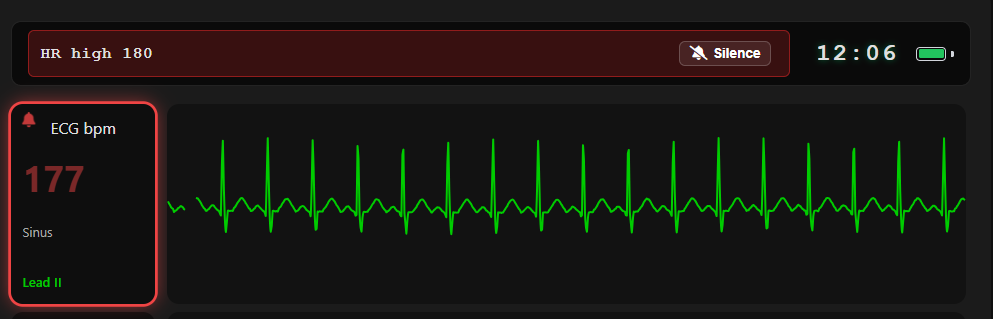
Patient Monitor Alarms

A full alarm system arrives on the student monitor, complete with an on-screen alarm bar, escalating alarm levels, and silence controls — bringing TMA in line with real-world bedside monitoring.

Event Log

Session activity is now captured in a running event log, giving instructors a clear record of what happened and when during a simulation.

Multi-Session Controller

One instructor, many sessions.

  • Session Selector: A tappable selector in the controller header opens a live overlay showing vitals and alarm states across every session you control.

  • At-a-Glance Alerts: If an unviewed session goes critical, the selector flashes the highest active alarm color.

  • Independent Sessions: Switching views never pauses a session — trends and timers keep running in the background.

Preloaded Scenarios

A new scenario dropdown loads complete vitals presets onto the controller in one click, with a guidance tooltip for each scenario — perfect for rapid scenario setup between student groups.

Advanced Session Controls

Expanded session management tools give instructors finer control over how sessions are created, joined, and run.

Feedback Portal

Have an idea or found a bug? Our new feedback portal is live at feedback.trainingmonitor.app — submit requests, vote on features, and follow our public roadmap.

Improved

Reset Session

"Reset to Default Vitals" is now Reset Session, with a confirmation modal to prevent accidental resets. One click restores all vitals to defaults, returns the rhythm to Sinus, clears BP history, and updates the monitor immediately.

Alarms Follow Visibility

When a vital is set to Not Visible, any alarm tied to it now hides as well — no more orphaned alarms for hidden parameters.

Rhythm ID Off = Truly Off

Turning Rhythm Identification off now removes the rhythm name entirely instead of blurring it.

Quality-of-Life Updates

  • QRS Beep now defaults to off for quieter session starts.

  • Session codes no longer use the easily-confused characters I or 1.

  • Narrow screens now display a recommendation to use a tablet or computer for the best controller experience.

Fixed

Waveform Redraw

Vital changes now update waveforms moving forward only — the trace already drawn on screen is never rewritten.

Display Off Silence

Toggling the Display Monitor off now hides the alarm bar and silences all alarm and QRS audio.

Polish Pass

  • Removed duplicate % from the SpCO label.

  • Resolved a glitch where a previous Heart Rate value persisted after updating.

  • Silence button text is now readable in light mode.

  • Header elements no longer overlap or cut off at certain widths.

  • Fixed container overlap in the battery menu.

  • Light and dark mode display spacing now match.

  • ECG dropdown heights standardized.

  • Added padding inside the Clear BP Hx button.
NewImprovedFixed

May 23, 2026 Updates

New

Vital Sign Trending

Apply vital changes gradually over 3–300 seconds instead of instantly, simulating realistic physiological responses to interventions.

  • Pause / Play / End Trend controls let you freeze, resume, or stop a trend while keeping vitals exactly where they are.

  • Live countdown and target values (e.g., "HR: 60 → 100 | 40s remaining") so you always know what's in motion.

  • Synchronized timing: all vitals changed in a single Apply start and finish together.

  • Server-side execution: trends keep running even if you switch screens or close your tab.

NIBP Blood Pressure Simulation

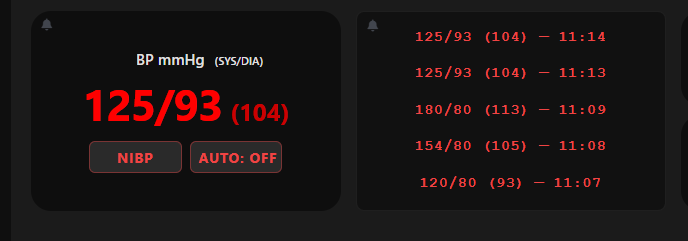
Blood pressure now behaves like a real cuff: values stay hidden until measured, teaching students that BP is a snapshot in time, not a continuous reading.

  • NIBP Button: Press on the monitor to start a 15-second measurement cycle.

  • AUTO Cycling: Set automatic measurements at 5, 10, or 15-minute intervals; manual cycles reset the timer.

  • BP History: The monitor displays the 5 most recent readings with timestamps.

  • Clear BP Hx: A controller-side button wipes the history between scenarios.

Controller & Viewer Permissions

Sessions now have two access levels, giving instructors full command of who sees what.

  • Viewers join via QR code or session ID and see only the Display Monitor.

  • Controllers join via a dedicated controller code with full access to vitals controls.

  • Auto-Generated Usernames: Every user receives a unique name so instructors can identify devices at a glance.

  • Session Management Page: Promote, demote, or remove users in real time from a sortable, searchable user table.

Improved

Display Settings Modal

Display Monitor, AED Trainer, Rhythm Identification, and NIBP Auto Cycle toggles have moved off the main controller screen into a clean popup, freeing up valuable screen space during live simulations.

Vitals Values Layout

  • Changed values are now emphasized so you can instantly spot what's staged to update.

  • Tighter desktop layout with restructured action buttons and less white space.

  • Mobile buttons reorganized into a square grid for easier tapping

Smarter Session Codes

  • Session IDs no longer use the easily-confused characters O or 0.

  • Typing a session ID now auto-capitalizes — no more case-sensitivity failures when joining.

Fixed

Light/Dark Mode Parity

Controller spacing and layout now match across both themes for a consistent experience.

Tablet UI Cleanup

  • Vital trend tooltip no longer cut off at the screen edge.

  • Alarm button icons repositioned away from container borders.

  • Reduced excess white space between ECG and Shock Outcome dropdowns.


NewImprovedFixed

May 9, 2026 Updates

New

Library of Pulse Oximetry Pleths

Introduced a new dropdown menu for Pleth Shapes. Similar to ECG rhythms, instructors can now select different waveform morphologies to change the visual shape of the plethysmograph on the student monitor.

  • Note: The waveform rate remains intelligently linked to the patient's Heart Rate.

Pulse Oximetry Pleth Amplitude

Added a new vital slider called Pleth Amplitude (Range 0-100). This allows instructors to manually adjust the vertical amplitude of the waveform.

  • 0: Results in a flat line (non-pulsatile).

  • 100: Displays a full-strength waveform.

  • Proportional Scaling: Adjusting this slider condenses the waveform vertically without affecting the horizontal timing or baseline, simulating varying perfusion levels.

Pulse Transit Time (PTT) Simulation - Waveform Synchronization & Offset

Introduced Pulse Transit Time (PTT) controls to provide a more clinically accurate relationship between the ECG and the SpO2 waveform.

  • Dynamic Waveform Positioning: The Pulse Ox pleth waveform now intelligently sits to the right of the ECG R-wave rather than overlapping it, simulating the physical time it takes for a pressure wave to reach the periphery.

  • New PTT Slider: Instructors can now manually adjust the transit delay between 150ms and 500ms (Default: 250ms).

Improved

Decoupled SpO2% from Waveform Height

Optimized the behavior of the Pulse Oximetry Pleth so that adjusting the SpO2 % value now only updates the numerical data on screen. Previously, lowering the percentage would also shrink the waveform; these are now independent to allow for more accurate clinical simulations.

New Vital Labeling System

To improve clinical clarity and ensure the student monitor matches real-world medical equipment, we have standardized the display of units across all vital sign tiles.

  • Integrated Units: Units are now appended directly to the vital label (e.g., Heart Rate: bpm) instead of taking up a separate row. This maximizes screen space while providing immediate context for the data being viewed.

Optimized Instructor Controller

Updated the instructor controller with a new layout and streamlined design to ensure a clearer viewing experience and easier navigation across all your devices, allowing you to focus on the simulation and see exactly what is happening at a glance.

Fixed

24-Hour Military Time Header

Updated the header clock to a 24-hour military format and removed the AM/PM designators to better align with professional clinical monitoring standards.

NewImprovedFixed

Earlier updates
